AP Syllabus focus: 'Technology, standard normal tables, or computer output can find proportions on intervals and estimate values from areas under a normal curve.'
Normal distributions let us connect areas under a curve to proportions and cutoff values. In AP Statistics, you should be able to move from values to areas and from areas back to values using tables or technology.
Areas Under a Normal Curve
In a normal model, the total area under the curve is 1, so any area represents a proportion of observations.
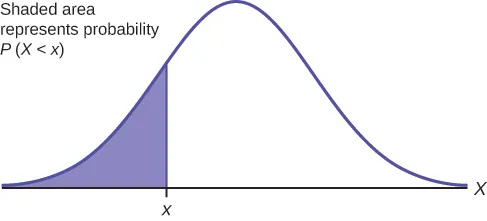
A normal density curve with the region to the left of a cutoff value shaded. The shaded area is labeled as the probability , illustrating the interpretation of cumulative (left-tail) area as a proportion of observations. Source
The same area can also be interpreted as a probability for a randomly selected observation from that model. When a question asks for the proportion less than a value, greater than a value, or between two values, it is asking for an area under the normal curve.
A left-tail area gives the proportion below a boundary.
A right-tail area gives the proportion above a boundary.
An area between two values gives the proportion in that interval.
A percentile identifies a location in the distribution rather than an area itself.
Percentile: The value in a distribution with a given percentage of observations at or below it.
Percentiles reverse the usual question. Instead of starting with a data value and finding an area, you start with an area or percentage and find the value that cuts off that proportion. For instance, the 90th percentile is the value with 90% of observations at or below it.
Standardizing and Using Tables
Standard normal tables are built for the standard normal distribution, which has mean 0 and standard deviation 1. If a variable has some other normal mean and standard deviation, convert the original value to a standardized value before using the table.
= standardized value measured in standard deviations
= original data value or cutoff in original units
= mean of the normal model
= standard deviation of the normal model
After standardizing, locate the row and column for the -value.
Most AP Statistics tables give the cumulative area to the left of , written as . Some tables use a different convention, such as area between the mean and , so always read the heading before interpreting a value.
When a problem involves an interval, combine table areas carefully.
For a value less than a boundary, use the left cumulative area.
For a value greater than a boundary, subtract the left area from 1.
For a value between two boundaries, find both cumulative areas and subtract the smaller from the larger.
For a value outside an interval, either add the two tail areas or subtract the middle area from 1.
Tables are especially useful for showing the connection between standardized values and areas, but they usually require rounding the -score to two decimal places. That means table answers are approximations, not exact values.
Using Technology and Computer Output
Technology often works directly with the original normal model, so it reduces both setup time and rounding error. Graphing calculators, statistical software, and online tools can compute normal areas and inverse normal cutoffs without needing a separate table lookup.
Finding Proportions on Intervals
To find a proportion with technology, enter the lower bound, upper bound, mean, and standard deviation. The output is the area under the normal curve between those bounds.
For a left-tail proportion, use a very small lower bound or a negative infinity option if available.
For a right-tail proportion, use a very large upper bound, an infinity option, or subtract a left-tail area from 1.
For a middle proportion, use both endpoints directly.
Computer output may display a decimal such as 0.842 or a percentage such as 84.2%. These represent the same proportion. Report the result in the form requested by the question, and include context when interpreting it.
Estimating Values from Areas
If you are given a percentile or an area and asked for the corresponding data value, use an inverse normal calculation.
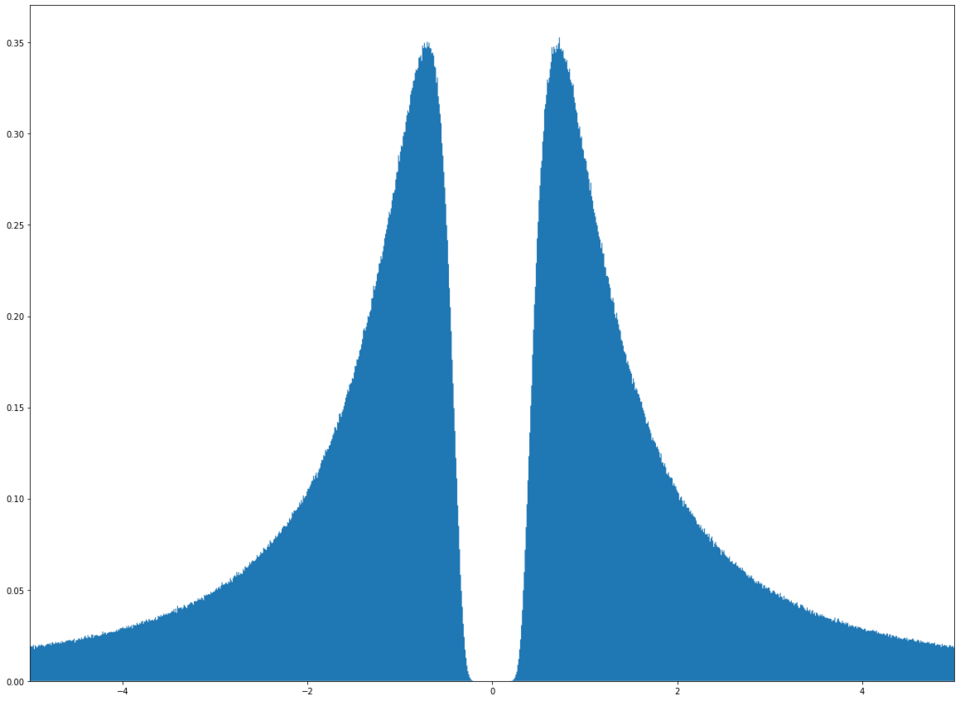
A graph depicting the inverse of the normal distribution, emphasizing the idea of going from probability (area) back to a corresponding cutoff value (a quantile). This supports the conceptual goal of inverse normal calculations: translating a target cumulative proportion into a boundary on the measurement scale. Source
This finds the cutoff value whose left-tail area matches the requested proportion.
Convert a percentile to a cumulative proportion.
Use the target area together with the mean and standard deviation.
If the question gives an upper-tail proportion, rewrite it as a left-tail area before using inverse normal.
State the answer in original units, not as a -score, unless the question specifically asks for the standardized value.
This idea is important because AP Statistics questions often move in both directions: from a score to a proportion, and from a proportion to a score.
Interpreting Results Correctly
When you read an area from a table or technology output, be clear about what it means. An area does not describe the height of the curve. It describes the share of observations in a region of the distribution.
A proportion of 0.25 means about 25% of observations are in that region.
A percentile is a cutoff value, not the percentage itself.
A result found from a normal model is an estimate based on that model.
Units matter: proportions have no units, but percentile cutoffs use the original measurement units.
A quick reasonableness check can prevent mistakes. Values far above the mean should have large left-tail areas and small right-tail areas. Values near the mean should have left-tail areas near 0.50. Symmetry also helps: equal distances on opposite sides of the mean have matching tail areas.
In AP responses, accuracy and interpretation both matter. Use the correct area, keep track of whether the question is asking for a proportion or a cutoff value, and express the final answer in the language of the context.
Practice Questions
The weights of packages shipped by a company are approximately normal with mean 500 grams and standard deviation 12 grams. Use technology or a standard normal table to find the proportion of packages that weigh less than 482 grams.
1 mark: Correct setup using technology or standardization, such as .
1 mark: Correct proportion, about 0.0668 or 6.68%.
The completion times for an online assessment are approximately normal with mean 42 minutes and standard deviation 6 minutes.
(a) Find the proportion of students who finish between 36 and 48 minutes.
(b) The slowest 15% of students receive extra time on a retake. Estimate the minimum completion time that would place a student in this slowest 15%.
(c) Interpret your answer from part (b) in context.
1 mark: Correct setup for part (a), such as standardizing both bounds or using a correct normal area command.
1 mark: Correct answer for part (a), about 0.6826.
1 mark: Correct setup for part (b), recognizing that "slowest 15%" means an upper-tail area of 0.15, so the left-tail area is 0.85.
1 mark: Correct cutoff for part (b), about 48.2 minutes.
1 mark: Correct interpretation for part (c), such as "A student who takes about 48.2 minutes or more would be in the slowest 15%, and about 85% of students finish in 48.2 minutes or less."
FAQ
Different tables report different kinds of area.
Some give the area to the left of $z$.
Some give the area between the mean and $z$.
A few give right-tail areas.
So two tables can both be correct but require different follow-up steps. Always read the heading and sketch the region mentally before using the number.
Use a very large positive number or a very small negative number that is far from the mean relative to the standard deviation.
For many AP Statistics problems, values several standard deviations away are enough because the remaining tail area is extremely small. The key is to choose a substitute that does not meaningfully change the result at the reported level of precision.
Tables usually round the $z$-score and the reported area, while technology keeps more decimal precision.
Because of that:
table answers are often approximate to four decimals,
calculator or software answers may differ in the last digit,
both are usually acceptable if the setup is correct and the interpretation matches.
Keep full calculator precision until the final rounding step.
Near the center of a normal distribution, a small change in area changes the cutoff value only a little. In the tails, the curve is flatter, so a tiny change in area can move the cutoff more noticeably.
That is why percentiles like the 99.9th are more sensitive to rounding than percentiles like the 60th. When working in the tails, use as much precision as possible before rounding your final answer.
Certain phrases point to specific cumulative areas.
"Lowest 20%" means left-tail area 0.20.
"Top 20%" means left-tail area 0.80.
"Middle 60%" means the two tails total 0.40, so each tail is 0.20.
"At least as large as" usually points to a right-tail region.
Rewriting the statement in terms of "at or below" often makes the correct cumulative area easier to identify.