

CIE Syllabus focus:
'Candidates should understand the use of computerised accounting systems to record financial transactions and the advantages and disadvantages of introducing them.'
Computerized accounting systems allow businesses to capture, process, and report transactions quickly. The key exam focus is how they record financial data and why a business may gain or lose from adopting them.
Nature of a Computerized Accounting System
A computerized accounting system is software used to record accounting transactions and produce accounting information. Instead of writing up books manually, data is entered electronically and processed by the system.
Computerized accounting system: An accounting system that uses software to record, process, store, and report accounting data electronically.
A system may be set up as a complete package or as linked modules, such as sales, purchases, payroll, inventory, non-current assets, and cash. These modules connect to the general ledger, so one entry can update several records at the same time.
This does not remove the need for accounting knowledge. The user must still choose the correct account, enter the correct amount, and understand the effect of each transaction.
How Financial Transactions Are Recorded
Input of data
Transactions are first identified from source documents, such as invoices, credit notes, receipts, bank statements, and purchase orders. The user then enters details into the relevant part of the software.
Common features of data input include:
transaction date
customer or supplier name
invoice reference
amount
tax code, where relevant
account or ledger code
Many systems use drop-down menus, templates, and validation checks to reduce simple entry mistakes.
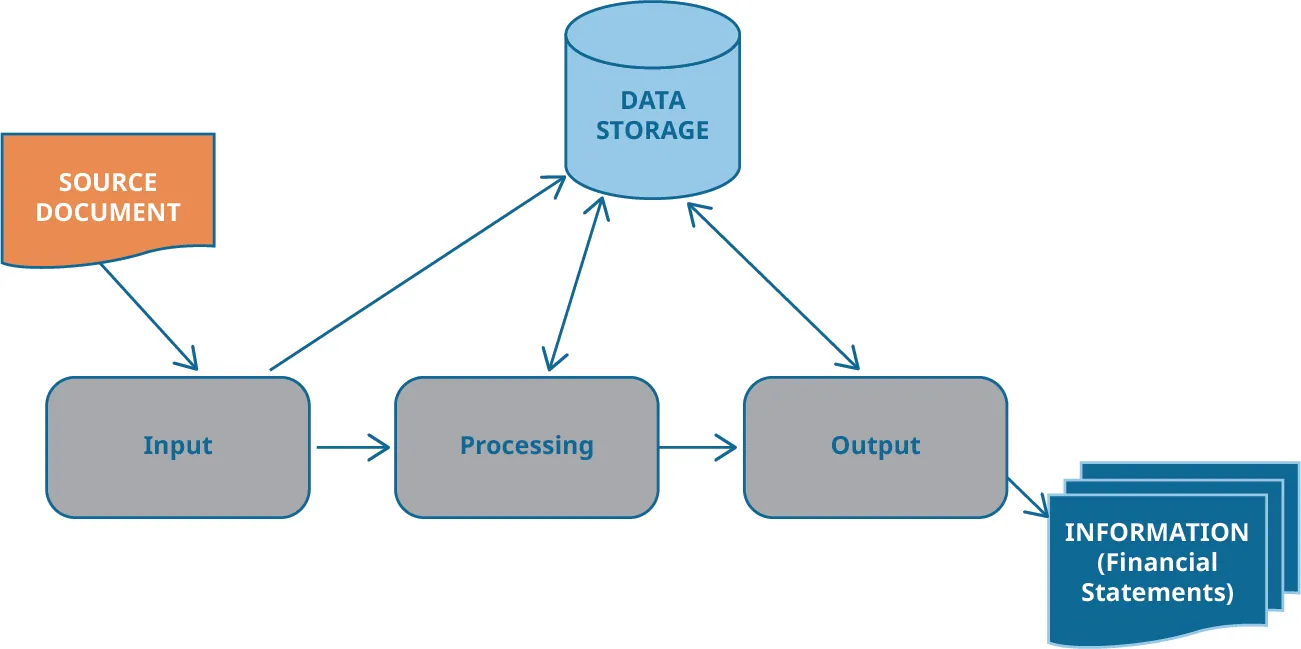
A simple Accounting Information System (AIS) flow diagram showing how a source document becomes input, is processed by the system, and is turned into output reports, with data storage supporting each stage. This directly reinforces the idea that computerized systems mainly change the method of recording and reporting, not the underlying accounting logic. Source
Processing of data
After input, the software processes the transaction automatically.
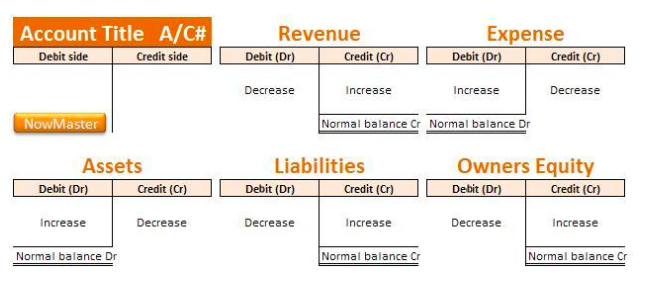
A labeled set of T-accounts showing how debits and credits affect Assets, Liabilities, Equity, Revenue, and Expenses, including each account’s normal balance. It supports exam answers that explain that computerized systems automate posting, but the double-entry rules (Dr/Cr logic) remain unchanged. Source
It may:
post the double entry to the ledger accounts
update receivables or payables balances
adjust inventory records
update the bank or cash balance
produce totals for the trial balance
A major feature is speed. Once entered, data can be processed immediately, and balances can be updated in real time. This helps management see current information rather than waiting for manual posting.
Audit trail: A record showing the path of a transaction from the original document to the final accounting records.
A good system also keeps an audit trail.
This makes it easier to check who entered a transaction, when it was entered, and what changes were made.
Output of information
The system can quickly generate accounting reports, including:
sales and purchase journals
ledger account balances
trial balances
statements for customers
aged receivables and aged payables reports
draft financial statements
This means accounting information can be retrieved quickly and presented in a clear format for managers and other users.
Advantages of Introducing a Computerized System
A business may introduce a computerized accounting system for several reasons.
Faster processing: Large numbers of transactions can be recorded much more quickly than in a manual system.
Improved accuracy: Automatic totaling, cross-checking, and posting reduce arithmetic errors.
Current information: Ledger balances and reports can be updated immediately after entry.
Greater efficiency: Routine tasks, such as preparing statements or totaling journals, are automated, saving staff time.
Better reporting: Reports can be produced in different formats and for different time periods with little extra effort.
Easy storage and retrieval: Digital records take less physical space and can usually be searched quickly.
Consistency: Standardized formats and procedures help produce uniform records.
Supports decision-making: Managers can access timely financial information, making planning and control easier.
Integration: One transaction can update several accounting records at the same time, reducing duplication of work.
These advantages are especially important for businesses with high transaction volumes. A manual system may become too slow or too complex, while software can handle repeated processing more efficiently.
Disadvantages of Introducing a Computerized System
Although the benefits can be significant, introducing a computerized system also creates problems and costs.
High initial cost: The business may need to pay for software, hardware, installation, and setup.
Training costs: Staff must learn how to use the system correctly. Until they are confident, errors and delays may still occur.
Need for maintenance: Software updates, technical support, and repairs may create continuing costs.
Dependence on the system: If there is a power failure, hardware fault, or software problem, accounting work may stop.
Risk of incorrect input: The system can process data quickly, but if wrong data is entered, the error may spread through many records.
Less suitable for very small businesses: A small business with few transactions may not gain enough benefit to justify the expense.
Changeover problems: Moving from a manual or older system can disrupt normal work. Opening balances and historical data must be transferred carefully.
Possibility of unauthorized access or data loss: Computerized systems can create risks if users access information they should not see or if records are lost.
It is important to recognize that a computerized system does not guarantee correct accounts. Good procedures, careful data entry, and knowledgeable staff are still essential. The software improves the method of recording, but it does not replace accounting judgment.
When evaluating whether to introduce such a system, a business should compare the expected benefits with the likely costs, the size of the business, the volume of transactions, and the skills of available staff.
Practice Questions
State two ways in which a computerized accounting system helps record financial transactions. (2 marks)
1 mark for each valid point, maximum 2 marks.
Valid answers include:
automatically posts entries to ledger accounts
updates receivables or payables balances
updates bank or cash balances
stores transaction data electronically
produces reports such as trial balances
Explain three advantages to a business of introducing a computerized accounting system. (6 marks)
1 mark for each valid advantage identified, maximum 3 marks.
1 mark for each clear explanation of that advantage, maximum 3 marks.
Valid advantages include:
faster processing of a large number of transactions
improved accuracy because calculations and posting are automatic
up-to-date financial information available quickly
easier production of reports
easier storage and retrieval of records
greater efficiency because routine work is automated
FAQ
Cloud-based software is accessed through the internet and usually charges a subscription fee. Desktop software is installed on a specific computer or local server and may use a license fee plus upgrade costs.
Cloud systems often make remote access and automatic updates easier. Desktop systems may give the business more local control and may still suit businesses with unreliable internet access.
Data migration means transferring accounting data from an old system, or from manual records, into new accounting software.
Common difficulties include:
incorrect opening balances
missing customer or supplier records
duplicated transactions
account codes that do not match the new system
historical data in the wrong format
If migration is poor, the new system may produce unreliable reports from the start.
User roles let different staff members see only the parts of the system needed for their work.
This helps by:
making screens simpler for each user
reducing accidental changes
separating responsibilities between staff
making training more focused
showing which employee entered or approved a transaction
Well-designed user roles improve workflow as well as accountability.
A bank feed is a link that imports transaction data from the bank into the accounting system.
Businesses use bank feeds to:
reduce manual entry
speed up the recording of receipts and payments
help match transactions more quickly
keep cash records more current
Imported data still needs review, because the software may suggest the wrong account or duplicate an entry if the setup is poor.
Accounting software can be linked to point-of-sale systems, payroll, inventory software, e-commerce platforms, and customer databases.
These links reduce repeated data entry and allow information to move automatically between systems. However, the business must check that dates, account codes, and transaction types are mapped correctly, or errors can pass from one system to another.